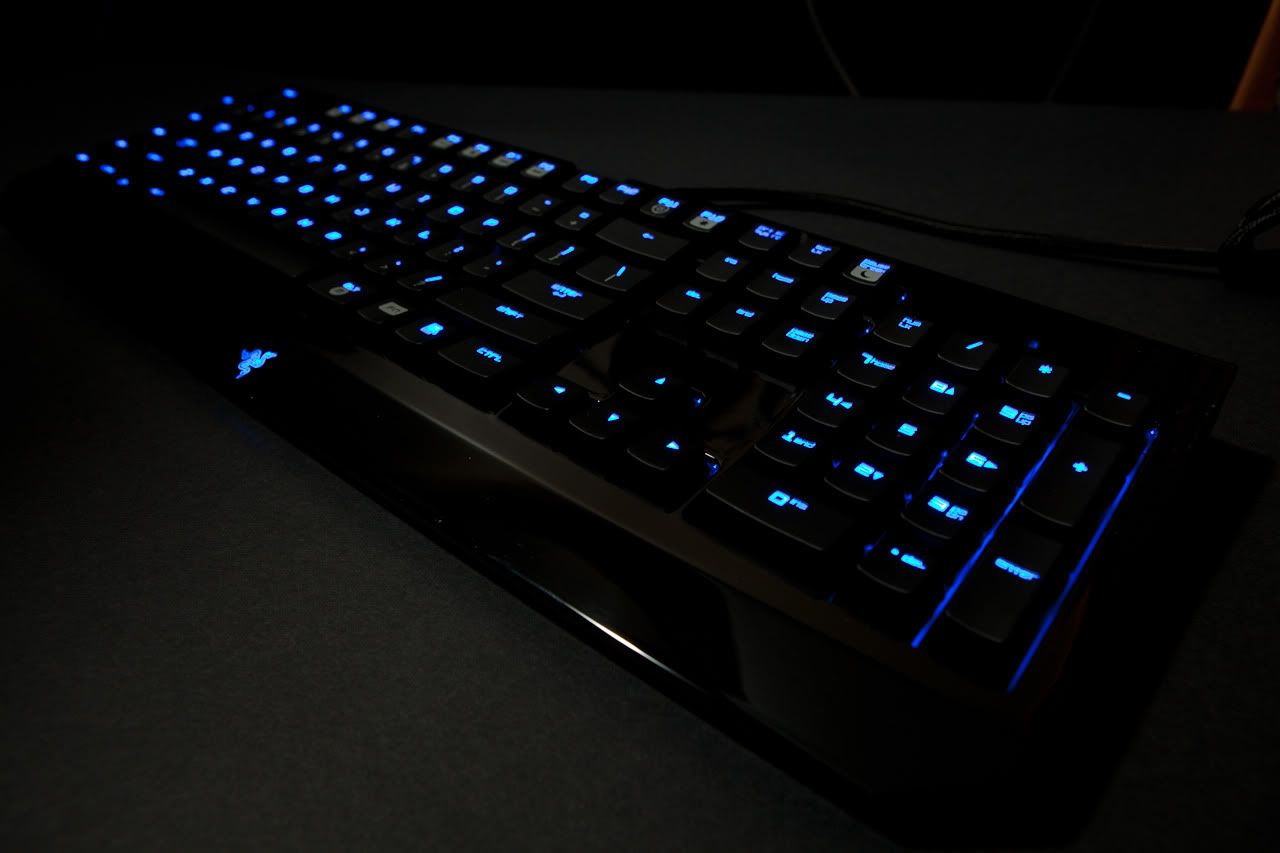
Hey guys what is up! SlayerL0rd here. Its been awhile since i did a review. So here is my review of the Razer Blackwiddow ultimate gaming mechanical keyboard.
Yes and as in accordance with most of my reviews, I do own one of these and used it before. In fact in using it now to type out this review!
Alright lets get down to it. As usual i'm keeping things simple with just a low down on the advantages and disadvantages.
Advantages

As with any mechanical gaming keyboard the obvious advantage is of course its mechanical keys. The difference between normal keyboards and mechanical ones is that normal keyboards have a rubber based background, meaning your keys return back to the original position due to the rubber elasticity. Eventually the rubber will wear down resulting you needing to press the keys with a little more force sometimes and it doesn't have that tactile feel anymore so its like typing on wood which doesn't bounce back. As for mechanical gaming keys they use what we call "Cherry mechanical" keys which are split into 3 colours for different types of tactile feedback "feels". The blackwiddow uses the blue Cherry keys which give the most tactile feel but are noisy as hell (i don't mind cause i love that sound) and are in the middle range of durability. Blue Cherry keys last for approximately 10 million keystrokes with Red keys also 10 million and Black keys at a staggering 50 million keystrokes (Keystrokes are essentially how many times you can click on that single key). Which is quite a lot technically speaking. Why are they so durable? That is because unlike rubber keyboards which use the rubber layer to repel the keys back to the original position, mechanical keys use a spring behind the key. As shown the by the above animation/ picture. Another advantage is the extra "macro" keys at the side of the keyboard. "Macro" keys are blank keys that don't do anything till you program them to. For example you could program the key to shut down the computer and just sabotage whoever's computer is being used at the time just by pressing that key. Its useful to certain extent and are best used in MMORPG or RPG games which you can program spells and skills into the keys. For the Razer Blackwiddow ultimate and the standard edition 5 programmable macro keys are available for your disposal. Next its the layout of the keyboard. Not much of a difference here with mostly everything the same. A small difference is how spaced out the keys are, the shape of the keys which are shaped in a concave design for maximum comfort and the top F1 keys are all shifted to the right a little to allow your finger to rapidly press it without the traditional problem where the F1 key is so left, often leaving you having to press it with your unfamiliar ring finger. Additionally the Razer Blackwiddow ultimate also comes in your flashy gamer backlit keys with a very nice shade of blue and each individual key lit up for your pleasure (minus the space bar key and the function key for programming the macro keys on the fly). There is a function key that has attached media buttons to allow music playback etc and also the ability to control the lighting of the keys. You can adjust the lighting of the keys from no light, to a little light, lots of light and a pulsing light which makes the keys "glow". Although i have to say the way i expressed the level of lighting the keyboards allow its rather crude and somewhat near the context of horrible English, but I'm sure you can roughly understand what I'm trying to bring across here. There is also a gaming function key that disables the windows key so that you don't suddenly fly back to the desktop in the middle of a firefight when you press that key. Also to better suit gamers the keyboard has microphone and audio jacks as well as a USB port on the right side to allow your headset or earpiece with a mic or not to be inserted in there and not all the way to the back of your desktop or the front. I'm quite impressed that Razer actually considered that. Well done indeed. So that means you can plug the keyboard's microphone and headset jack into the back of the computer and connect your headset or earpiece to the keyboard instead of the back of the desktop reducing the frustration of messy cables at the back to unplug when you want to take your headset out or no need for extension of cables because the wire is too short.
Disadvantages
As with anything in the world, nothing is perfect. So here are the cons about this beast of a keyboard. As it said earlier the keyboard is mechanical and has durable keys, however I had this beast for about 4 months and magically, some of the keys were not working. So i sent it for an exchange and I'm guessing its probably a manufacturing problem instead of me breaking it, either way its a bit of a problem with the durability there but now I've got a completely new keyboard in exchange for about a week now and its working fantastic now. Another problem is the pricing. I got mine from my own supplier and he charged me SGD 172 which is pretty alright considering outside they sell it in between 199- 250. Honestly you don't spend over 160 in getting keyboard and I think its not exactly worth that price. Maybe if it were 150 or so then i would be more comfortable in purchasing it. However the standard edition of the Blackwiddow costs only 128! Whats the difference? No backlit keyboard. Thats all. For example a CS storm trigger mechanical gaming keyboard with almost everything that this keyboard has costs only 158. Another problem is the weight. If you're not going out often with it then it shouldn't hinder you that much but i do go out with my keyboard to friend places or the LAN to chill with some of my bros, it weights like 3-4 kg and that isn't exactly light.
Conclusion
Overall though would i recommend this? Yes if you have the cash to burn, if not, the standard edition would do well and give you the same experience as having the Ultimate version.
I hope this helps you guys in considering to get this keyboard and if you like these reviews do message or tell me via the Clan's twitter (
https://twitter.com/#!/AzuReClan), my personal twitter (
https://twitter.com/#!/SlayerL0rd) or you can email us at AzuReClanCrew@hotmail.com.
Thanks and I'll see you soon!
-SlayerL0rd